

As someone who analyses digital traffic and platform shifts, let me be clear, OpenAI’s launch of ChatGPT Atlas is not just another tech announcement. It marks a foundational shift, transitioning generative AI from isolated chat interfaces into the very gateway of the web. This strategic product launch is an aggressive attempt to become a primary competitor for web traffic, forcing us to rethink the future of online productivity.
This new competitor is ChatGPT Atlas, OpenAI AI-powered web browser, designed to elevate the user digital experience by embedding the power of ChatGPT directly into the browsing interface. The browser is positioned as a true super assistant that can help users understand the world and achieve complex goals.
Why OpenAI Needs a Browser (The $15B Risk)
The move into the browser space addresses a core business imperative for OpenAI profitability. The browser functions as the ideal infrastructure to pull in internet traffic and support high-value subscription features, such as the autonomous agent Mode.
Crucially, this launch directly challenges Google search model, which relies heavily on link-based advertising. Google is constrained because aggressive integration of AI answers risks cannibalizing its lucrative ad revenue, while OpenAI faces no such conflict, allowing Atlas to optimize entirely for user experience and utility.
Is ChatGPT Atlas Built on Chromium? Availability Timeline
A critical technical detail is that Atlas is built atop the open-source Chromium engine. This strategic choice maximizes market velocity by leveraging Google’s established codebase, instantly allowing OpenAI to challenge the incumbent.
Atlas initially launched for users on macOS. OpenAI has committed to a full market push, with versions promised for Windows, Apple’s iOS mobile platform, and Google’s Android system.
The Core User Experience: How Atlas Embeds AI Everywhere
The core differentiator of ChatGPT Atlas is its ability to embed AI deep within the user experience, making assistance constant and contextual.
Contextual Assistance: The ‘Ask ChatGPT’ Sidebar in Action
Atlas eliminates the cumbersome copy-paste workflow by introducing a dedicated Ask ChatGPT button, which launches the interface in a sidebar. This grants the AI immediate, permission-based access to the content of the currently active web page.
Furthermore, when a user highlights text, a discreet overlay appears, immediately offering actions such as drafting, rewriting, explaining, or translating the selected content. This allows users to leverage powerful LLM capabilities without interrupting their workflow, enabling quick summaries of lengthy articles, PDF breakdowns, or code analysis. OpenAI advises users to remain vigilant for hallucinations and to check critical outputs, especially during complex analyses.
Agent Mode Breakdown: Autonomous AI and Task Delegation
The most potent and highly differentiated feature is the Agent Mode. This functionality moves the AI from a sophisticated assistant to an autonomous delegate capable of executing complex, multi-step workflows.
Agent Mode in Action: From Shopping Carts to Research
Agent Mode is the browser’s multi-step task automation tool, allowing ChatGPT to take limited, proactive actions on behalf of the user within the browser environment. The agent excels at high-value tasks, such as:
- E-Commerce and Logistics: Parsing a recipe, constructing an ingredient list, logging into an online grocery vendor, and automatically pre-filling a shopping cart.
- Productivity: Booking appointments, arranging travel details, or gathering comprehensive research from multiple web sources.
Agent Mode is restricted to users with specific subscription tiers, serving as the central pillar of OpenAI monetization strategy. Access is limited by monthly message caps, such as 40 messages per month for Plus subscribers and 400 for Pro subscribers, reflecting the substantial computational and security costs of autonomous execution.
Agent Mode Safety: Mandatory Blocklists and User Control
Users maintain control through the ability to guide the agent or interrupt any task mid-execution. For security, safety, and compliance, a mandatory blocklist is enforced, restricting the ChatGPT agent from visiting certain sensitive websites, ensuring a critical layer of protection for the user.
Privacy Architecture: Does Atlas Use Your Browsing Data for Training?
OpenAI recognized that success hinges on implementing an architecture that proactively mitigates the data risks associated with deep integration.
Permission-Based Context: Atlas Privacy vs. Chrome
Atlas employs a permission-based model to ensure transparency and control. The AI only analyses page content when the user explicitly enables assistance (e.g., highlighting text or prompting the sidebar).
Crucially, Atlas uses highly visible consent layers, and by default, it will not utilize consumers’ browsing data to train its underlying AI models. Users retain control over the AI’s memory features and can remove context simply by deleting their standard browsing history. However, users have been advised to exercise caution and avoid using Atlas on financial websites or for purchases until more comprehensive security protocols are shared.
Comparison: Atlas vs. Google Gemini and Agentic Rivals
The launch of ChatGPT Atlas signals the official start of the AI Browser War, redefining browser functionality and challenging the economic foundation of the current internet ecosystem.
Why Gemini Can’t Go All-In Like Atlas
Google Chrome currently controls approximately 70% of the global browser market share. However, if a modest 10% of Chrome users shift to Atlas for search queries, the revenue risk to Google’s search ad business could reach $15 billion annually.
While Google has integrated its Gemini AI into chrome, it must proceed cautiously to avoid cannibalizing its primary link-based advertising business. OpenAI faces no such constraint, granting Atlas a massive long-term advantage in user-centric innovation.
At a Glance: Atlas vs. Chrome vs. Perplexity
Below table provides a concise technical comparison between the core competitors in the emerging AI browser segment.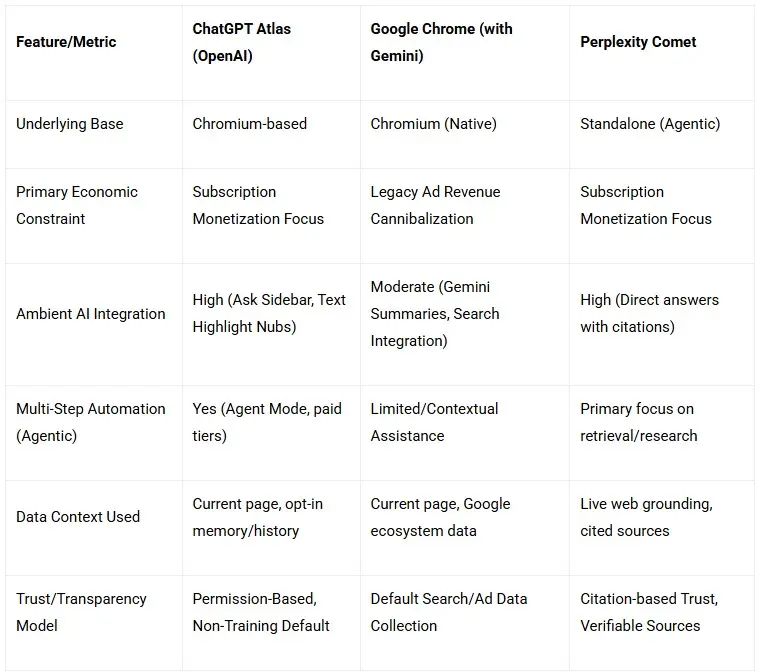
The Final Verdict: Is ChatGPT Atlas a Chrome Killer?
Here is the final word for those of us in the digital marketing trenches, Atlas is not an immediate chrome killer, but it is a definitive economic model disruptor. It challenges Google $150 billion ecosystem by bypassing the need for link-based advertising revenue, allowing it to optimize purely for user delegation and efficiency.
Its ultimate success and the resulting market fragmentation will hinge entirely on the perceived value of its premium Agent Mode and OpenAI ability to deliver absolute security and reliability. As a digital marketer, we must adapt to a world where the AI acts on the user behalf, making the utility of our content more critical than ever before.
How Marketers Can Leverage ChatGPT Atlas
- Streamline Research: Use the sidebar to summarize competitor pages or campaign reports instantly.
- Enhance Content Creation: Highlight and rewrite text directly in-browser for quick copy adjustments.
- Data Collection: Let Agent Mode compile research or market data from multiple sites.
- Campaign Planning: Use Atlas to ideate, draft, and automate parts of marketing workflows.
As digital marketers, embracing these tools early will not only save time but redefine how we approach creativity, optimization, and performance tracking in an AI-native web.
Do you think ChatGPT Atlas can actually challenge Chrome or is it just hype?
Drop your thoughts below. I’d love to hear how you think this will impact SEO, content strategy, or digital marketing workflows.